Showing posts with label facebook tricks. Show all posts

Monday, October 19, 2015

How to accept a friend request on facebook without anyone knowing

Be The First To Comment
accept secret facebook friends request without anyone knowing
Now, we'll show you how you can accept a friend request without anyone knowing( add a friend in secret ). So, if you'd like to accept someone as a friend in the most discrete manner possible, thus hiding your activity from others simply follow the next guide.


Let's say that a friend of yours whom you want to keep secret from your other facebook friends sends you a friend request. Just follow the next steps to accept his request without anyone knowing.

Step 1: Accept the friend request by pressing "Confirm"

Step 2: Access your profile's Timeline and navigate to "Recent Activity"

Step 3: Click the "X" on the "Now Friends With" announcement and then click on "Hide this Recent Activity Story".

In this way, you will manage to hide your friend acceptance from your Timeline and it won't be visible in your other friends' news feed.


Hope you liked this awesome tip, that ensures your new friend acceptance stays secret.

Also, follow this trick to keep this facebook friend totally secret.

Comment below and have fun.

Monday, October 5, 2015

Best Facebook Tips and Tricks for 2015 - Must Read

Be The First To Comment
best top facebook tips tricks hacks pic 2015
In Best Facebook Tips we offer you Facebook Tips and Tricks daily. In this post we list the best tips for 2015. You can find these useful tips and tricks below.

Here is the list:

1. Find who deleted or unfriended you on Facebook - Ever wondered why the number of your friends has changed? The app who.deleted.me has the answer. Simply connect your Facebook account to find who deleted or unfriended you.
who deleted- blocked- me- pic facebook

2. Have secret friends on Facebook - If you want to add a friend on Facebook and communicate with him/her secretly follow this guide.
secret facebook friends trick

3. Secretly accept a friend request on Facebook - This guide will show you how to add a friend on facebook without anyone of your other friends finding out.
secretly accept friend request facebook

4. Make your own unique Facebook Timeline Covers - Follow this awesome guide that will teach you how to create a timeline cover to showcase your style.
cool unique facebook timeline covers

5. Log Out of Facebook automatically - If you want to be sure you have always successfully log out of facebook read this tip.
log out automatically facebook

6. Turn Off chat for certain friends - This trick will help you get rid of those annoying facebook friends.
turn off chat annoying friends

7. Discover Hidden Facebook Pages - Did you know that there are some hidden facebook urls? Follow this guide to unveil them.
hidden secret facebook pages urls

8. Clear your Facebook search History - If you are afraid that someone might snoop in your account, you can clear your search history by checking this tip out.
clear facebook search history

9. Find Hidden Facebook Messages - Read this tip if you want to find a secret folder containing messages you have not read yet.
hidden secret facebook messages

10. Fake your Location on Facebook - Trick your friends into thinking your are at a location you are actually aren't by following this awesome guide.
fake facebook location hack

Thursday, September 17, 2015

Tip #33 - Discover Hidden Facebook Pages/Urls

Be The First To Comment
secret facebook pages urls

Did you know there are some hidden urls/pages on facebook? If you didn't, today we show you how to access these pages and get useful information like upcoming events or friends' birthdays. Keep on reading.
Below we list a handful of hidden urls designed to enhance your facebook experience.

1)The OnThisDay page

Ever wondered what events occured or you had a part in last year or five years ago. Well, this feature will certainly give you some memories to look back on.

on this day pic facebook feature

Just hit https://www.facebook.com/onthisday and prepare to have a feels trip.

2)Standalone Messenger page

You probably didn't know this, but at https://www.messenger.com you can find the standalone messenger page where you can easily chat with your friends and find every old and new message. Check it out. It has a nice interface and it's really handy.

facebook messenger standalone page
3)Find Upcomng Birthdays

You might know this secret. If you want to access the upcoming birthdays of your friends just go to 
the url https://www.facebook.com/events/birthdays.


Read THIS if you want to learn how to have secret facebook friends or THIS tip on how to create a secret facebook group.


4)Discover Upcoming Events

If you feel the need of going to a party or an event near you or you are just curious about what's going on the next days navigate to https://www.facebook.com/events/upcoming.


If you happen to know other secret and cool facebook pages add them in the comment section below. Have fun.

Saturday, September 12, 2015

Tip #32 - How to : Turn off chat for certain friends

Be The First To Comment
chat offline facebook friends tip trick

Today, we discuss how you can avoid those annoying "friends" by hiding from them. Turning off chat(appearing offline) will do the trick. Keep reading.

Follow these simple steps below:
1)Log into your profile
2)Navigate to the chat options on the bottom right corner
3)Click Options and then Advanced Settings...
4)On the pop-up window choose to Turn off chat for only some friends... and write their names in the field.
5) Hit Save and you are done.

Read also: How to hack a Facebook account - The Ultimate Guide

As you can see there are also the options to turn off chat for all friends except... and turn off chat for all friends. Use these options according to your needs.

Remember, the messages of the people for whom you turned chat off(you will be seen as offline) will be sent to your inbox if you want to read them. Comments in the section below.

Thursday, September 10, 2015

How to : Hack Facebook Account - Steal Password - The Ultimate Guide

Be The First To Comment
Welcome to the ultimate guide on how a Facebook account is hacked. Today, we learn what are the best ways to steal a Facebook password (or passwords of other services as well), hack into an account and of course how can you protect yourself from anyone trying to hack your account.
hack unlock steal facebook password

***Keep in mind that this post is educational. You should use the knowledge you acquire from this guide to protect yourself online. Any illegal activity from your part, does not reflect the purposes of this post and its author.***

So, let's dive into the guide.

How to hack a Facebook account - The Ultimate Guide

Hack an account with your magic set of skills (...and the lack of a strong password) aka the guessing technique

We'll start by simply being creative. Ok, what do I mean by that? Just guess the password. Don't be surprised. Many people still use common passwords like 1234... or their date of birth or even their cell phone number. A really cool infographic at kaspersky.com illustrates users' password habits. 
So, why don't you give it a shot...
weak password jpeg

Social engineering can be the key for this technique to work. If you know the person whose account you are trying to hack into, ask him seemingly innocent questions about things he values in his/her life(ex. favourite number, name of parents,gf/bf,pet etc.). Combining this info might give out the password. Good luck.

!!!Our safety tip!!!
Never ever use an easily guessable password. Be sure that your password is at least eight characters long and contains letters, numbers and symbols. The stronger, the better.

Chances are you didn't succeed with the first step. Well, that pretty much all you can do... Just kidding. Continue reading!!!

Steal someone's password using phishing

What is phishing?

Phishing is the attempt to acquire sensitive information such as usernames, passwords, and credit card details (and sometimes, indirectly, money), often for malicious reasons, by masquerading as a trustworthy entity in an electronic communication.
phishing password facebook

Simply put, if the user wants to access facebook, he/she has to type in his username/password. If you make him think your page is facebook or needs the passcode for some features to appear, then the user might be tricked into revealing his credentials to a third party.

So, all you have to do is create a phishing page that asks the user for his username/password while your website doesn't seem suspicious. If the user is convinced, he/she will offer his credentials in your hands.

To setup a website like that you'll need a web costing account (you can find plenty, free of charge), upload your documents used to create it(ex. a facebook logo and a neat user/pass field). Now, every time someone enters information to the fields above, a file will be created storing this info for you to see. Simple as that.

Just hand your url to your friends and hope there are plenty of phishes in the sea. You saw what i did there?

!!!Our safety tip!!!
Never hand out your credentials to sites you don't trust. Even, if a page asks you for your password be sure to check that it redirects you to the official facebook page.

Read also: Best Facebook Tips, Tricks and Hacks

Sidejacking with Hamster and Ferret

No, this is not a family movie's name.
What is sidejacking?

Sidejacking is the process of stealing someone's access to a website, typically done on wireless public networks. To access to a website, the bad actor uses a packet sniffer to obtain an unencrypted cookie(session cookie) that grants access to a website, such as webmail.

For this to work, you need to be in the same network the user you are trying to steal from is. If you are in a public network,oh boy, start hunting.
sidejacking public network facebook

We will use Linux(Backtrack-Linux will definitely do the trick) for this one. Some tools are available in Windows too.

Follow the steps below:
i)Download Hamster and Ferret if they aren't already in your machine.
ii)Extract and build using the terminal.
iii)Open terminal in Hamster's folder and start Hamster with command "./hamster".
iv)Open your browser and go to http://127.0.0.1:1234
v) Select adapters and type eth0 for ethernet or wlan0 for wireless network.
vi)Now, you must see some targets(their ip address) if someone else is using the network too. You can sidejack his/her session just by clicking the links on the left panel.

Remember, with this technique you don't acquire usernames/passwords but you gain instant and full access to other people's accounts(at least till they log out). This must be what you wanted in the first place, right?

!!!Our safety tip!!!
Never trust public networks. Always log in to your accounts from trusted networks(ex. your home) that are properly protected. Also, remember to log out of your accounts after you have finished your work.

Read also: How to secretly accept a friend request on Facebook

If all of the above fail, the next trick will certainly do it.


Defeat SSL with sslstrip

What is SSL?
SSL(Secure Sockets Layer) is a standard security technology for establishing an encrypted link between a server and a client—typically a web server (website) and a browser; or a mail server and a mail client (e.g., Outlook).

Facebook uses SSL. Twitter uses SSL. LinkedIn uses SSL. Everybody uses SSL(I'm quoting Oprah here). If this wasn't the case, oxid's Cain and Abel would be the go to solution.

Here comes sslstrip though. Sslstrip is a python program created by Moxie Marlinspike that has the capability to "hijack HTTP traffic on a network, watch for HTTPS links and redirects, then map those links into either look-alike HTTP links or homograph-similar HTTPS links".
ssl strip facebook tip chart

Let it to the experts. Just follow his tutorial on his official website (http://www.thoughtcrime.org/software/sslstrip/).

!!!Our safety tip!!!
Same goes for this one. Always log into safe networks. You never know where the intruder will be. Take care.

That was the guide on how to : Hack into a Facebook account and steal someone's password. Hope you found it useful. Comment in the section below.

Wednesday, March 12, 2014

Facebook trick to find out numeric code or "Name Code" of your profile name

Be The First To Comment
Have you ever gone through very closely about your profile name and its important details? This does not mean about the privacy settings that you actually set while maintaining your account. But the information of knowing the "Name Code" of your profile id. 


If your profile id is as follows... www.facebook.com/xyz , then "xyz" means the profile name or id that your are using. But the name code for it is different and unique. 

To know your unique profile name code in Facebook, do the following: 

Step 1:  Log in to your account
Step 2:  Copy the URL of your profile id 
Step 3:  Go the link http://findmyfacebookid.com/
Step 4:  Enter your copied URL. You can now see the unique name code of your profile. 

Now thats how you can know your "Name Code" of profile id in Facebook. 


Monday, December 23, 2013

How to add "Countdown Timer" for Fan Pages

Be The First To Comment
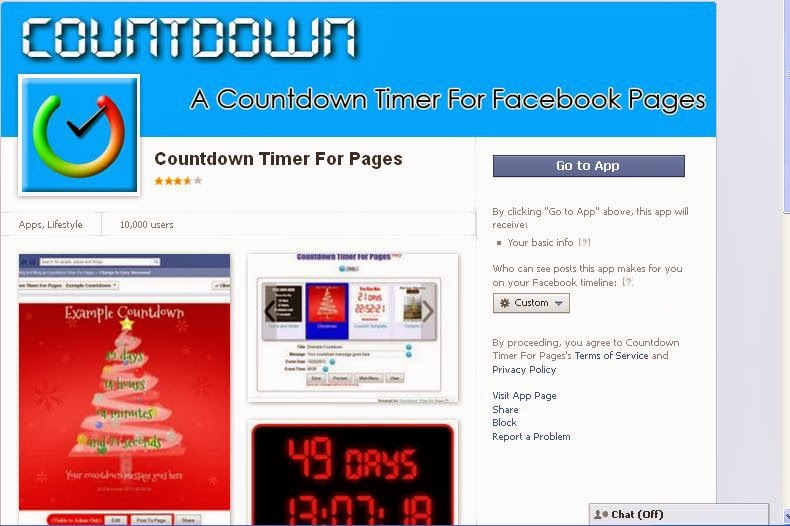
To make your business fan page or any other fan page interesting, some interactive tabs or apps have to be installed. One of the best tabs is "Countdown Timer" tab or  app.

The main intention to have this tab in fan page is to display the timer of days left for an event. You can have this for displaying a countdown timer for any festival like Christmas too.
 
 
To install a "Countdown Timer" app to your Facebook fan page, 

  • Log in to your Facebook account
  • Type "Countdown Timer" app in Graph search. There you will get list of different type of apps. Select "Countdown Timer For Page" app   

  • Click on "Go to App" button 
  • Select from the list of fan pages that you are admin of and click "Add" besides the page name 
  • Select the type of display you want the timer to be on your selected fan page
  • After selecting the type, now start entering the details in the text boxes below. First enter the title of the timer then the message for the viewers. 
  • Enter the event date and time 
  • Click "Save" and then click "Preview" button. 
  • Now you can see the timer for a particular event which displays the remaining days and time left. 
  • Now if all things are right, then click "View" button 
  • The tab will be seen on the page. 
  • Click "Post to Page" for finishing the process. 
  • Lastly check whether the tab is seen on the page by clicking your page name. 

Look in the image above. If the tab is inserted it will be displayed with this icon as shown above. 

Successfully you have set a "Countdown Timer" app or tab for your Facebook Page. 


Saturday, November 30, 2013

5 Free Facebook "iPhone Apps"

Be The First To Comment
Today most of the people use their mobile devices to access Facebook and any other social media. There are in-built apps or can be downloaded. 

This post relates to some 5 free iPhone or iPad apps which are related to "Facebook".
Facebook not only gives a platform for sharing but also makes money for business. Social networking is not for sharing and liking but also using it for important issues.

Listed below are 5 "Free" useful and important iPhone apps related to Facebook.

    • Emoji for iOS7: This app is for chat lovers. You can use this app for sending cool , awesome "Emoji icons" while chatting. Specially designed for iOS7 users, this app is compatible with all devices like iPhone, iPad and iPod Touch. Using this app you can select fancy fonts, create your own emoji icons, etc.
    •  
       
    • Facebook Camera: This app is designed for sharing photos on Facebook faster than ever.

                Over 460+ emoji icons which you can add in emails, text messages, notes, and almost anywhere. 
                  
                
    • Facebook Pages Manager: This app helps admins connect with their audience and keep up with activity on multiple Pages, all in one place.
    •  
       
    • Countdown!!  : Featured to take care of your next event - your next vacation, the next concert, the next movie premiere, your child's graduation, your anniversary and more - in style!

    These applications will definitely get more out of your Facebook and use the better options while chatting, sharing status updates, uploading images or videos, fan pages, personal events , etc. And the list will never end as lots of apps are found on iTunes for iPhone and iPad users who are interested in "Social Networking".

    Surely these 5 free apps will help you out in some or the other way on the daily basis while using Facebook on your mobile device.


    Saturday, November 23, 2013

    Tip #31 - How to : Make your profile picture non-clickable

    Be The First To Comment
    profile picture non clickable pic
    You should have noticed by now that in BestFacebookTips blog we are really serious about facebook privacy settings. Today, we present you the way to make your profile image non-clickable, so strangers won't be able to click on your photo. Here is how to do it.
    Follow these steps:

    1. Log into your facebook account.
    2. Go to your photos and then albums.
    3. Click on your profile photos and select your current profile picture.
    4. Click the pencil "Edit" icon.
      lock pic
    5. Now, among other things, you can select the audience who can view this image. Selecting "Only Me" will do the trick.

    Now, your profile pic is no longer clickable by anyone except you. Of course, you can experiment with the above settings and make the pic available to friends, friends of friends, etc.

    Hope you liked our tip. Comment below and have fun.

    Sunday, November 17, 2013

    Best Facebook Tips and Tricks 2013 (Updated)

    Be The First To Comment
    best facebook tips tricks hacks pic
    You may have already read a previous post on best facebook tips and tricks for 2013. As four months have passed since that post, we have decided to create a new list with updated and even more awesome facebook tips, tricks and hacks. Are you ready to discover the deepest facebook secrets and enhance your social networking experience? If so, find our tips below.

    Ultimate Facebook Tips, Tricks and Hacks List 2013

    1. Fake Location on Facebook

      This is a really cool trick. If done correctly, you can fool your friends into thinking you checked in from a mobile device and from a place of your choice. Find out how to fake your location.
      fake location pic

    2. Enable Pirate Mode

      Ready to try something different? Enable pirate mode on facebook and feel like a real pirate. Argh!
      pirate mode pic

    3. Customize Facebook

      If you ever get bored by the default facebook layout, you can easily customize it following the tips on this guide.
      customize facebook pic

    4. Block and Unblock People

      I guess there are always some really annoying people on facebook bothering you all the time. Luckily, you can block those friends. And if you ever change your mind you can easily unblock them.
      block unblock people pic

    5. Clear Facebook Search History

      Did you know that facebook keeps your search history? So, if you are afraid that someone might gain access to your profile and view this search history, clear it using our guide.
      clear facebook search history pic

    6. Log Out of Facebook Automatically

      You may forget to log out of facebook from times to times. It can happen to anybody. To dodge this bullet though, you can follow our guide on how to log out of facebook automatically.
      log out facebook automatically pic

    7. Create Facebook Timeline Covers

      Having a nice facebook timeline cover can really make your profile stand out. So, read our tips on how to create your own timeline covers.
      create facebook timeline cover pic

    8. Hide Status Updates from Friends

      Posting status updates is one of the most common things people do on facebook. But, if you want to hide some of your status updates from certain friends, be sure to check this guide out.
      hide status updates pic

    9. Create Photo Collage of Facebook Friends

      You may have seen those beautiful photo collages other users create using profile pictures of their facebook friends. Now, you can create one too. You just have to follow our guide on how to create photo collage of your facebook friends.
      create photo collage facebook friends pic

    10. Download Facebook History

      Ever needed to download your facebook history on your hard drive for future reference? Of course there is a way. Read how to do this here.
      download facebook history pic
    Hope you liked our updated tips. Suggest yours in the comment section below.
    Have fun!

    Thursday, November 7, 2013

    Tip #30 - How to : Unblock a user on Facebook.

    Be The First To Comment
    handshake pic
    Last month we showed you how to block users on Facebook. Today, we teach you how to unblock someone who is previously blocked. Follow our guide below.
    The steps are simple:

    1. Log into your Facebook account.
    2. Click the lock icon on the top right of your page.
      unblock users pic
    3. Click "How do I stop someone from bothering me?"
    4. Click "View All Blocked Users".
    5. Click "Unblock" next to the name of the user you wish to unblock.
    Really simple, huh? Just, remember that the unblocked user will not be added back to your friends list immediately after your action. What you need to do is to send this person a new friend request.

    Comment below and have fun.

    Saturday, November 2, 2013

    Tip #29 - How to : Remove Facebook ads

    Be The First To Comment
    stop remove facebook ads pic
    We all miss the good old times, when Facebook didn't have these annoying ads popping up everywhere. So, if you want to enhance your experience and remove facebook advertisements read our awesome tips below.
    You can easily get rid of Facebook ads using one of the following tips:

    • Use Greasemonkey and Facebook: Cleaner : You can easily remove Facebook ads with Greasemonkey and Facebook: Cleaner. Just add greasemonkey to firefox and then use the facebook:cleaner script.

    But, it might be trickier to follow the above tip. Fortunately, you can also:
    • Use F.B. Purity add-on for firefox. With F.B. Purity you can hide ads and app spam from your news feed.
      facebook purity addon
    Must Read: 5 Facebook Addons, Extensions and Apps for Mozilla Firefox and Google Chrome.
    • The easiest and univesal solution would be to install one of the popular adblock add-ons and extensions for Mozilla Firefox and Google Chrome.
      mozilla firefox google chrome
    • List of adblock add-ons for firefox and extensions for chrome.
    Hope you found our tips and tricks easy to follow and got rid of those annoying facebook advertisements.
    Comment below and have fun.

    Tuesday, October 22, 2013

    Tip #27 - How to : Hide Facebook Likes

    Be The First To Comment
    like thumbs up pic
    It comes a time when we all like a facebook page of an artist, a group etc. and we don't want our friends or the public to find out. Well, of course there is a solution to hide those embarrasing likes from your profile. I found this trick over at lifehacker's(if you don't know this site, I seriously suggest you to visit it; it has all these killer life hacks; it's really cool) website and is really handy. Read the tip below.
    Follow this simple guide:

    1. Log into your Facebook account.
    2. Go to your Likes page and click the edit option.
    3. Remove the like you don't want others to see from the category it currently resides by clicking the "X" that shows up while hovering.
    4. Now, find another category you don't use and change its privacy setting to "Only Me" as shown in the picture below.
      only me like option pic
      Select "Only Me" option to make the category private.
    5. Simply add your like to the category you set as private.
    Done, now only you can see your embarrasing likes.


    (Updated on October 22nd)
    The above tip doesn't seem to work now, as Facebook updated some of these settings. However, I figured out some possible solution similar to the aforementioned.
    1. Log into your account.
    2. Go to the Likes page.
    3. Set a category you don't use to "Only Me".
    4. Now, the part that might or might not work. While being on the private category, search for the page you want to like using the search box above suggestions. It's really important to use this search box and not Facebook's Graph Search.
    5. If you are like and you do find the page you want click it and it will be added to the private category. 
    This way you will continue to receive updates on your news feed, but your friends won't know you like this page.

    Hope you found our trick interesting. Comment below and have fun.

    Saturday, October 19, 2013

    Google adds "Facebook Ads"

    Be The First To Comment


    Two big competitors, Google and Facebook have announced yesterday, that the "Facebook Ads" will be sold by Google. Google's DoubleClick bid manager will sell Facebook ads which will be able for marketers to buy ads for Facebook's Ad exchange platform. 

    Google's DoubleClick is a type of ad technology foundation to create, transact and manage digital advertising for buyers, creators and sellers. 


    Google says, "Partnership has been key to Google’s success as a rising tide lifts all boats.  So we’re excited to announce a new way to help our clients succeed by working with Facebook to participate in FBX, their real-time bidding exchange…we’re always looking at ways to serve our clients even better – starting in a few months, clients will be able to buy inventory on FBX via DoubleClick Bid Manager.”

    The FBX was launched by Facebook in June 2012. This let advertisers to buy cookie based re-targeted ads on Facebook's site. Due to this, now the advertisers can go via Google's DoubleClick to purchase inventory. 

    Google added that FBX ad inventory would become available through its platform in the forthcoming months. 

    Saturday, October 12, 2013

    Introducing Facebook for Android "Alpha Testing Program"

    Be The First To Comment
    Newly introduced Facebook in Android's testing program, there is a process going on to know feedback of Android users. For this they launched a new program named as "Alpha Testing Program". 


    As it is still in the developmental process, Facebook is looking out for some reactions about Android users.

    Facebook wants to get feedback at an earlier stage in the development process.As stated in "The Next Web", both the alpha and beta programs will be pretty similar. 
    More information on this update here: "Alpha Testing Program" 


    Monday, October 7, 2013

    Best Facebook Trick : Fake Location on Facebook

    Be The First To Comment
    compass pic
    You probably know the Facebook Check In feature by now. What you might not know is this trick we present you today, to fake your location on Facebook. So, completing this hack you will be able to check in from whatever place you want and post status updates with your chosen location via mobile, while you are just sitting at your home computer. This trick is really useful if you want to keep your current location secret, prove you were somewhere you actually weren't or simply have fun with your friends. Try it. It works 100%.
    For this tip to work you are going to need the Firefox browser and two Firefox add-ons. Follow the steps below:
    1. Add the following add-ons to Firefox: Geolocater and User Agent Switcher.
      geolocater firefox addon pic

      user agent switcher firefox addon pic
    2. Go to Extensions (Ctrl+Shift+A) and on Geolocater click Options. To add your custom location click Geolocations-New and search for the location you want. When you are ok click Geolocations-Switch and then Geolocations-Save. You are now geolocated on the location of your choice.
      geolocater fake location pic
      Here i choose my fake location to be Central Park
    3. Again, go to Extensions (Ctrl+Shift+A) and on User Agent Switcher click Options. There you can select the fake device you are going to use, for example iPhone. Then hit OK.
      user agent switcher options pic
    4. You are now ready to go to https://touch.facebook.com/.
      facebook mobile touch pic
    5. Log into your account on Facebook and post your status update after you have clicked on Check In. You'll notice that you are able to select places or events near the location you chose earlier. Click on the place you are interested in. Done. You just posted an update from a fake location.
    Hope you enjoyed this awesome trick. Comment below and have fun.
     

    © 2015 Facebook Tips and Tricks 2016 - Designed by Mukund | ToS | Privacy Policy | Sitemap

    Hide
    X